Michael Darlan

There are two ways to get email security automation wrong, and I’ve watched companies nail both.
Company A automates everything.
The AI quarantines whatever it likes, nobody checks, and the CFO’s wire confirmation from the bank sits in quarantine for three days. Finance finds out when the bank calls. Fun meeting.
Company B automates nothing.
Every flagged email goes to a human. The human is one person. That person has 400 alerts in the queue on Monday morning and starts clicking “release” just to see the bottom of the list. Also a fun meeting, just later and worse.
The right answer sits somewhere in between. At our October roundtable with IRONSCALES, Felix Velez, Paulo Veloso, and I spent a good chunk of time on exactly this question. Here’s the framework we use.
Why this suddenly matters
The attacks themselves haven’t changed much. Phishing, impersonation, fake invoices, the classics.
What changed is the speed. An email that took an attacker 30 or 40 minutes to write now takes seconds, so the same attacks show up a lot more often.
No security team grew tenfold this year to match. So the question stopped being “should we automate?” and became “which decisions can we safely stop making by hand?”
Paulo, our host, put the other side of it well. AI is the best thing to happen to our daily work, and he still doesn’t trust it 100%.
“I do believe that the humans still have that touch, still have that context that sometimes is missing from machine learning, from AI.”
Paulo Veloso, OneAxiom
Both things are true at once, and the framework below is how we reconcile them.
The framework: confidence vs. blast radius
Every email threat answers two questions. How sure is the AI that it’s malicious? And how bad is it if the AI gets the call wrong? Plot those two, and the decision mostly makes itself.
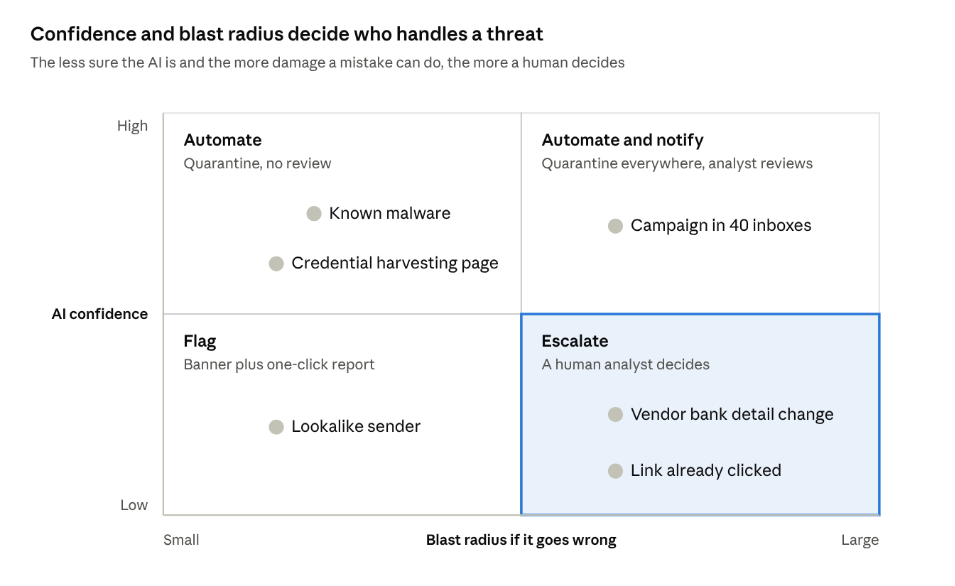
High confidence and low stakes, let the machine handle it. Low confidence and high stakes, a person decides. Everything in between gets a warning label or a quick human check after the fact.
Automate, flag, or escalate
Felix laid out how IRONSCALES handles it, and it maps cleanly onto three buckets.
Automate the obvious.
Known malware, a URL or attachment that matches an indicator of compromise, a credential harvesting page, a blatant impersonation with a “click here urgently” ask.
Nobody needs to look at these; pull them out of every inbox automatically and move on.
Flag the gray areas.
Some emails are suspicious but not suspicious enough to yank. Felix’s example: an email from “F.Devin Velez” at Gmail when the real Felix writes from his company address.
Close enough to fool someone, not definitive enough to delete. These get a warning banner that tells the user exactly what looks off, plus an easy way to report it.
Escalate what needs judgment.
A trusted vendor suddenly asking to change bank details. A reported email that might have landed in 40 other inboxes. A click that already happened.
These go to a human analyst, because the right move depends on context the model doesn’t have.
| Bucket | Examples | Action | Who decides |
| Automate | Known malware, IOC matches, credential harvesting pages, blatant impersonation | Quarantine from every mailbox automatically | The AI |
| Flag | Lookalike senders, unusual requests from known contacts, first-time senders | Warning banner plus one-click report | The user, with help |
| Escalate | Payment or bank changes, user reports, possible account takeover, anything clicked | Analyst investigates and remediates | A human analyst |
The step people skip: when a human overrules the AI, that correction should feed back into the model. Felix called this reclassifying. Every mistake you fix should make next week’s automation a little smarter.
Pick your poison: false positives or false negatives
Every automation setting is a bet.
Tune it aggressively, and you catch more attacks, but you also quarantine some real email. Tune it relaxed and the business flows smoothly, right up until something nasty gets through.
“How tolerant you are of false positives as opposed to false negatives, but also how much time can you allocate to a tool.”
Felix Velez, IRONSCALES
There’s no universal right answer, but there are honest questions that get you to yours:
- What does a missed attack cost you? A law firm wiring settlement money and a 30-person design studio have very different answers.
- What does a blocked real email cost you? If sales lives and dies by inbound leads, an aggressive filter has a price too.
- Who’s watching the quarantine? If the answer is “nobody, really,” relaxed settings are a fantasy. Things will slip through and no one will notice.
- How many people can review flags? One part-time IT person can’t run a gray-area queue with 200 items a day. Be realistic.
Felix’s default advice to most MSPs and SMBs was simple: better safe than sorry. Lean toward catching more, and make it painless to release a false positive.
I’d add one thing: write the decision down. When the CFO asks why his email was quarantined, “we chose this on purpose, here’s why” goes over a lot better than “huh, weird.”
Keeping a human in the loop without drowning
“Human in the loop” sounds great in a slide deck. In practice, it means somebody has a queue, and queues grow. A few habits keep that queue humane.
Let the AI group the noise.
AI-written campaigns are polymorphic: same payload, different subject line, different sender, different IP. A good tool clusters those into one incident, so your analyst investigates one campaign instead of 40 lookalike emails.
Make every user report count.
When someone reports a suspicious email, the next question is always “who else got this?” Answering that by hand, mailbox by mailbox, is how afternoons disappear.
Automate the search and the cleanup, and keep the judgment call for the human.
Hand the hard stuff to people who do it all day.
Most companies can’t staff an analyst around the clock to stare at gray-area email.
That’s fine. It’s exactly what an MDR team like ours is for: the AI handles the volume, and our SOC handles the judgment, including what happens after a click.
Train the last line of defense.
Even with great automation, some emails reach people. The banner only works if users know what to do with it.
Frequently asked questions
Should email security be fully automated? No. Automate high-confidence threats like known malware and credential harvesting pages, and keep a human in the loop for gray areas and anything involving money, account access or a click that already happened.
What email threats are safe to auto-quarantine? Emails with known malicious attachments or URLs, credential harvesting pages, and blatant impersonation attempts. These have clear signals and a low chance of being legitimate.
What is human-in-the-loop email security? An approach where AI filters and sorts email threats automatically, while people review uncertain cases, investigate user reports, and correct the AI’s mistakes so it improves over time.
How do I reduce false positives in email security? Decide your risk tolerance on purpose, use warning banners instead of quarantine for medium-confidence cases, make releasing a quarantined email quick, and reclassify mistakes so the model learns.
What should a small team do if it can’t review flagged email all day? Lean on automation for the obvious threats and hand the judgment calls to a managed detection and response (MDR) provider whose analysts do this around the clock.
Let the robots do the boring part
Automation should do the work nobody needs to think about, so people can think about the work that matters. Skip that balance in either direction, and you’ll end up in one of those fun meetings from the top of this article.
Felix, Paulo, and I dug into this and more in our October roundtable with IRONSCALES, including Direct Send, calendar invite phishing, and what our SOC does after a click.
Watch the recording and grab the slides.
Written by Michael Darlan, Cybersecurity Specialist at OneAxiom
Edited by Julia Araujo, Marketing Manager at OneAxiom