Michael Darlan
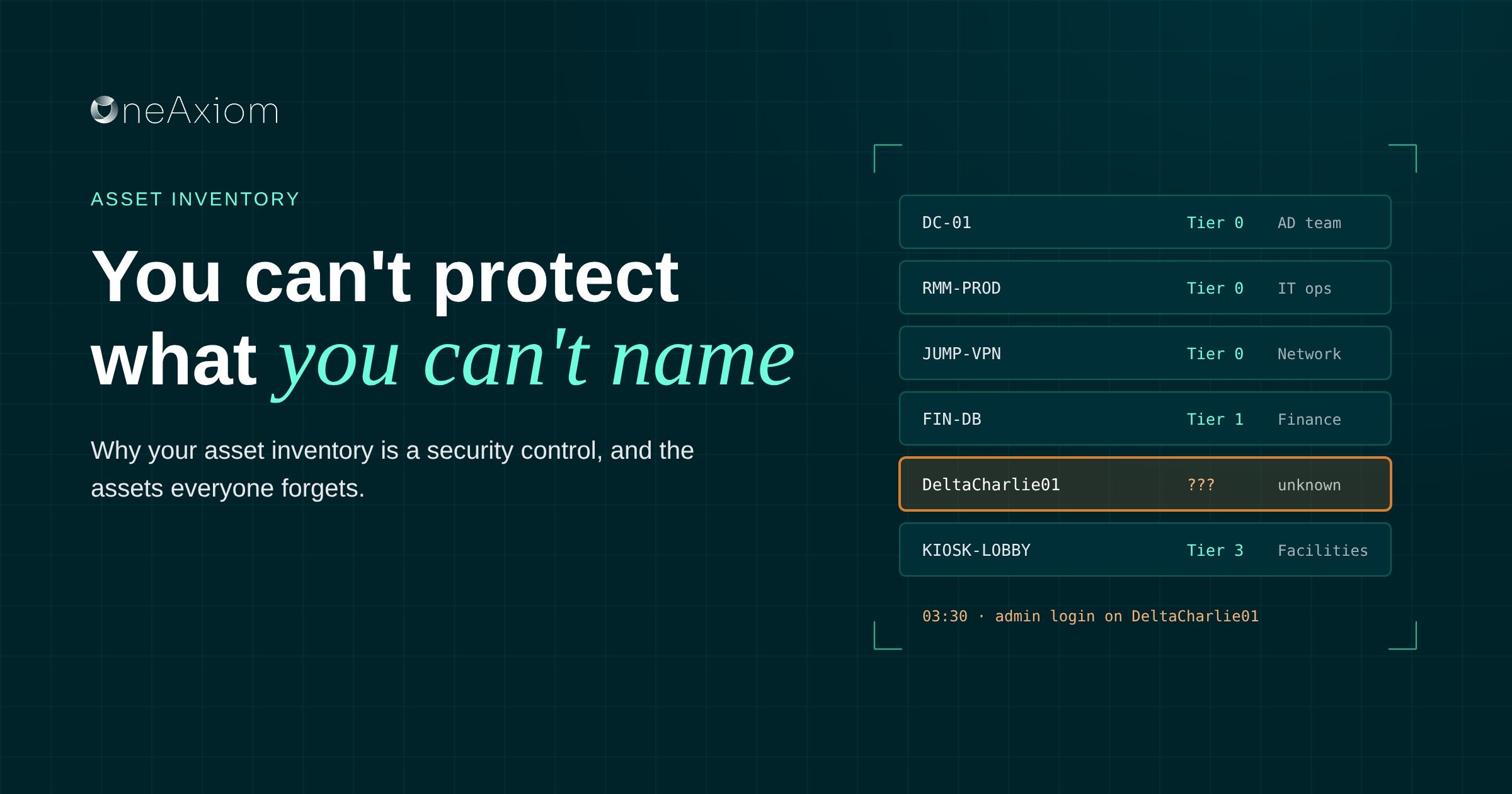

It’s 3:30 a.m. Your phone rings. It’s your security provider: “We’re seeing admin credentials used on DeltaCharlie01. Is that a critical server?”
You have no idea what DeltaCharlie01 is. Nobody does. The asset inventory project got pushed to next quarter. Again.
The short answer: An asset inventory is a current list of every device, application, account and remote access tool in your environment, with its owner, its importance and what it can reach. It’s what lets a security team decide in minutes whether an alert is a curiosity or an emergency.
The assets most often missing are the most dangerous ones: remote monitoring and management (RMM) tools, jump hosts and privileged service accounts.
Why asset inventory matters for security
Every alert is a question: how bad is this? You can’t answer it without knowing what the alert is about.
Triage needs context. The same suspicious login means one thing on a kiosk in the lobby and something very different on the server holding customer data.
Priorities follow criticality. Your most important systems should get the fastest escalation and the deepest investigation. If you don’t know which ones they are, everything gets the same urgency, which means nothing gets the right urgency.
Containment needs a map. To shut an attacker out quickly, you need to know what a compromised system can reach, what it trusts and who owns it.
Auditors ask for it anyway. NIST, ISO 27001 and PCI DSS all expect you to know what you have and how critical it is.
The assets everyone forgets
The servers usually make it onto the spreadsheet. The tools that control the servers often don’t.
- RMM and remote access tools like the ones your IT team or MSP uses to support machines
- Jump hosts and bastion servers that open tunnels into the whole network
- Privileged accounts, including MSP admin users, domain accounts and service accounts
- Credentials baked into scripts and automation pipelines
These are the keys to the building. Attackers know it. In 2025, CISA warned that ransomware actors were exploiting unpatched SimpleHelp RMM instances to compromise a utility billing software provider and its downstream customers. One RMM server, many victims.
The asset inventory lifecycle
An inventory isn’t a project you finish. It’s a loop you keep running, because your environment changes every week whether you update the spreadsheet or not.
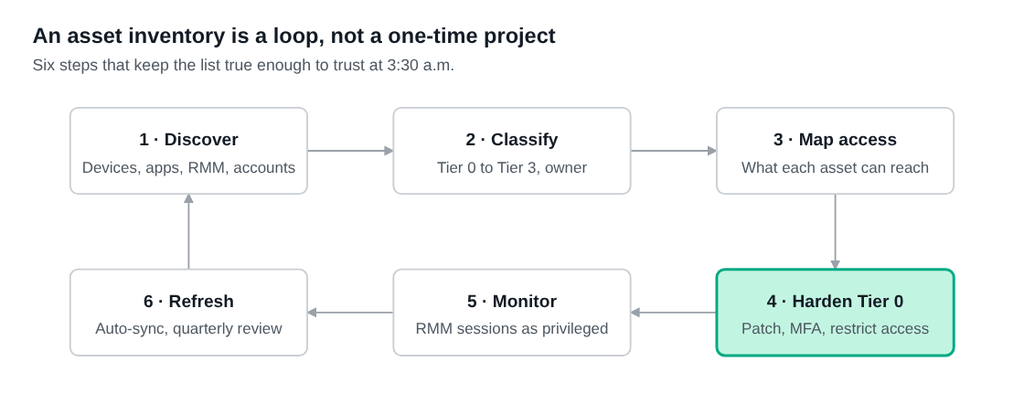
Step 4 is highlighted for a reason. Hardening your Tier 0 tools is where the inventory stops being paperwork and starts reducing risk.
What to track for each asset
A list of hostnames isn’t an inventory. For each asset, record what it is, how much it matters, what it can reach and who to call. Here’s what that looks like in practice:
| Asset | Type | Criticality | What it can reach | Owner |
|---|---|---|---|---|
| Domain controller #1 | Server | Tier 0 | Active Directory, DNS, Group Policy | AD team |
| RMM server (production) | Remote access tool | Tier 0 | 20+ client environments, admin credentials | IT ops or MSP |
| VPN jump host | Bastion host | Tier 0 | Tunnels into the whole network | Network ops |
| Finance database | Data system | Tier 1 | Confidential financial data | Finance team |
| Helpdesk remote support VM | Remote access tool | Tier 1 | User workstations | Helpdesk |
| Lobby kiosk | Workstation | Tier 3 | Internet only | Facilities |
Tier 0 means “if this falls, everything falls.” Notice the RMM server sits right next to the domain controller. That’s the point. Also track the vendor, version and internet exposure, so you know what needs patching the day an advisory drops.
How to build an asset inventory that stays current
The hard part isn’t building the list. It’s keeping it true six months later.
- Discover everything. Pull from your EDR, Active Directory or Entra ID, your MDM, your cloud consoles and network scans. Then specifically hunt for RMM and remote access tools running on endpoints. You’ll find some nobody remembers installing.
- Classify by criticality. Assign each asset a tier, from Tier 0 for domain admins, core network and RMM, down to low-risk devices like kiosks.
- Map the access chains. For every privileged account and tool, write down what it can reach. An RMM service account that touches every endpoint is Tier 0, whatever its name says.
- Harden the Tier 0 tools. Patch RMM software fast, put it behind a VPN or zero trust gateway, restrict it to known IP ranges and require MFA.
- Watch them like privileged sessions. Log RMM sessions, alert on use outside maintenance windows, and flag connections to servers a tool has never touched before.
- Plan for losing them. Keep immutable, offsite backups that RMM tools can’t reach, and run a drill where your RMM is the thing that got compromised.
- Automate the refresh. A spreadsheet updated once a year is a historical document. Sync the inventory from your tools on a schedule, and review it every quarter.
Frequently asked questions
What is an asset inventory in cybersecurity?
A current list of every device, application, account and tool in your environment, with each one’s owner, criticality and access. Security teams use it to prioritize alerts and contain incidents.
Why is asset inventory important for incident response?
It tells responders what a compromised system does, how critical it is and what it can reach, so they can decide quickly how serious an alert is and what to isolate.
Should RMM tools be in my asset inventory?
Yes, and usually as your most critical assets. RMM tools have admin access to many machines at once, which makes them a prime target for ransomware groups.
What are Tier 0 assets?
Systems that control everything else, such as domain controllers, identity providers, core network devices, RMM servers and jump hosts. If one is compromised, the whole environment is at risk.
How often should an asset inventory be updated?
Continuously, through automated syncs from your security and management tools, with a human review at least once a quarter.
Know what DeltaCharlie01 is before 3:30 a.m.
You can’t protect what you don’t know you have, and you can’t triage what you can’t identify. Start with the tools that hold the keys, give everything an owner and a tier, and keep the list fresh enough that your security team can trust it in the middle of the night.
If you’d like help finding the assets your current inventory is missing, book a call with our team. We’ll walk through your environment and show you where the gaps are, whether or not you work with us.
By Michael Darlan, Cybersecurity Specialist at OneAxiom