Michael Darlan
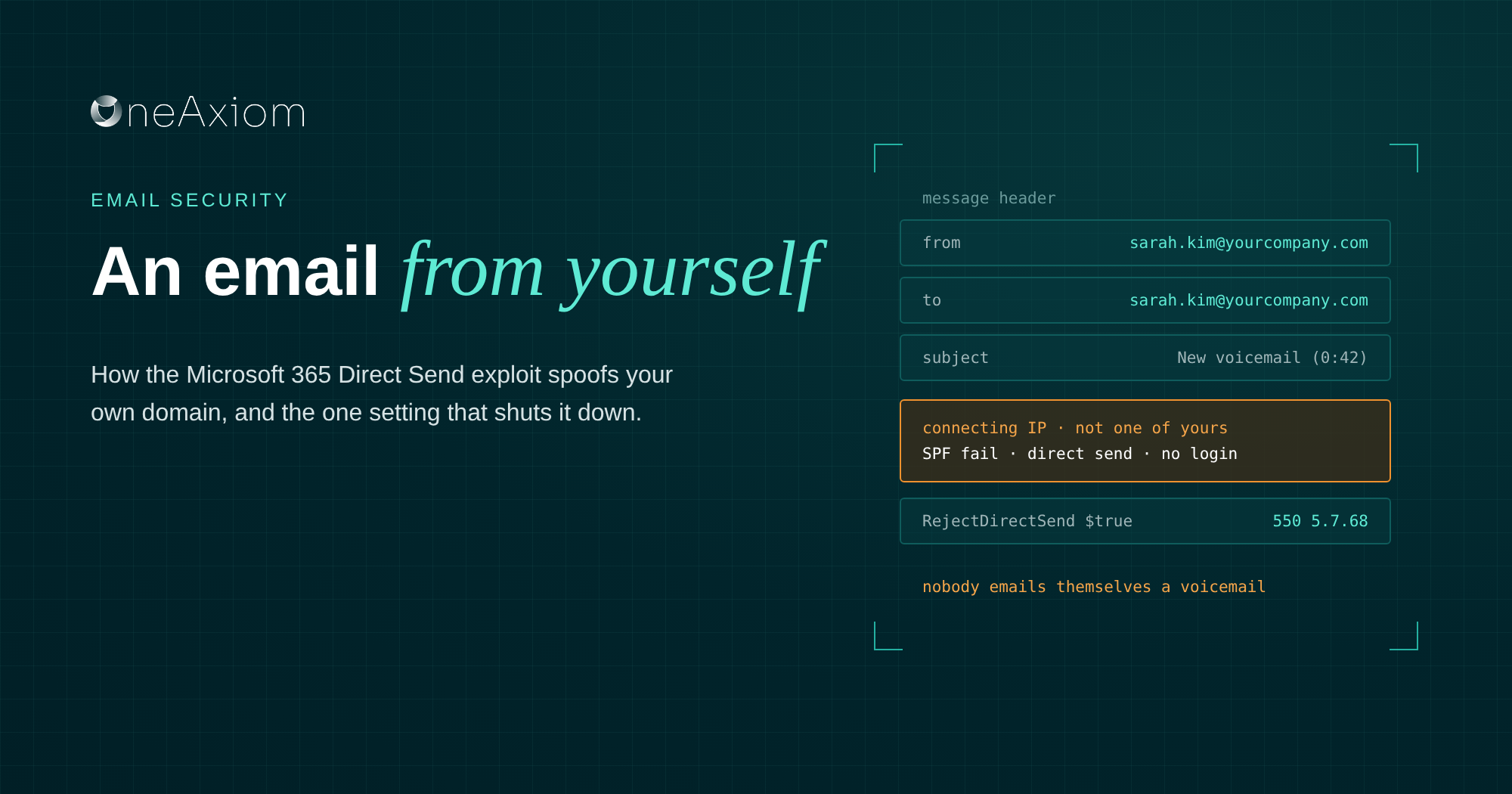

From:    Sarah Kim <sarah.kim@yourcompany.com>
To:      Sarah Kim <sarah.kim@yourcompany.com>
Subject: New voicemail (0:42) from +1 (305) 555-0147
Attached: Voicemail_Transcript.pdf
Read that header one more time. Sarah left Sarah a voicemail. Sarah then emailed Sarah the transcript, as a PDF, with a QR code to “listen now.” Sarah is a very busy woman.
Of course, Sarah didn’t send anything.
Somebody on the other side of the world did, using a Microsoft 365 feature that lets anyone drop mail into your tenant wearing your own domain. They didn’t need to steal a password or hack the account, but just an unlocked side door Microsoft left open for your printers.
At our October roundtable, Felix Velez from IRONSCALES called this the “me to me” attack, and the name stuck. The official name is the Microsoft 365 Direct Send exploit.
It walks past DMARC like it owns the place, and plenty of filters hold the door. Here’s how it works and how to shut it down.
What is Direct Send?
Direct Send is a Microsoft 365 feature that lets printers, scanners and older applications email people inside your organization without logging in.
The device connects straight to your tenant’s mail endpoint, uses your own domain in the From line, and Exchange Online delivers it. It only works for internal recipients, which is why nobody worried much about it.
It exists for a sensible reason. That scanner in the copy room doesn’t have a mailbox or a password, and it still needs to send you that 40-page PDF you’ll never read.
Microsoft itself recommends Direct Send only for advanced customers willing to take on the responsibilities of email server admins. Translation: this thing has no lock on the door, so you’d better know who’s walking through it.
How the exploit works
Every Microsoft 365 tenant has a public mail endpoint, and its address is built from your domain name. If your domain is company.com, the endpoint is something like company-com.mail.protection.outlook.com. Anybody can work that out in about four seconds.
From there, an attacker needs one line of PowerShell to send a message to that endpoint with your domain in the From field. Exchange Online sees your domain, assumes it’s one of your devices, and delivers it.
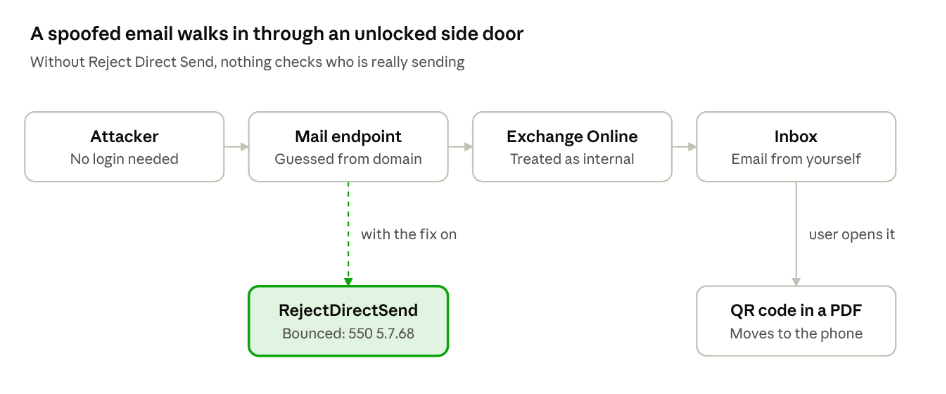
The lures follow the same playbook every time: a new voicemail, a document to e-sign, a direct deposit change before payroll, an HR form for the new hire.
Attackers lean on internal-looking topics because the email already looks internal. And once the victim scans that QR code on their phone, the attack has left your network entirely.
Why it gets past your filters
The short version: the email looks like it never left your building.
1. It looks internal.
The From line uses your own domain, often the recipient’s own address or a coworker’s. Your users are trained to be suspicious of strangers. They are not trained to be suspicious of themselves.
2. No account was compromised.
There’s no stolen password, no weird sign-in, no impossible travel alert. Your identity tools have nothing to flag because nobody logged in to anything.
3. Authentication doesn’t save you.
SPF, DKIM, and DMARC exist to catch outsiders pretending to be you.
A Direct Send message is delivered through Microsoft’s own infrastructure into your tenant, so depending on how your mail flow and filtering are set up, it can sail through as trusted internal traffic.
Even when the checks technically fail, plenty of environments let internal-looking mail through anyway because “it’s from us.”
4. The payload is quiet.
Many campaigns skip links in the body entirely. The bad stuff lives in an attached PDF with a QR code, which moves the victim to their phone, far away from your email security and your managed browser.
A brand new exploit beats most filters until the filters learn its shape, and attackers know it.
“Even just two years ago, when the Direct Send exploit was visible to us, we probably had like a 60% efficacy rate in catching those. And now we’re very, very good at catching the Direct Send Microsoft exploits.”
Felix Velez, IRONSCALES
How to detect Direct Send abuse
First, find out who legitimately uses Direct Send in your environment. You can’t spot the impostor until you know the regulars.
Inventory your senders.
List every printer, scanner, app, and service that emails your users without a mailbox. Note the public IP each one sends from. Anything not on that list that shows up claiming your domain is a suspect.
Read the headers.
On a suspicious internal message, open the message headers and check the Authentication-Results line. A real internal email from a coworker passes. A Direct Send spoof from somewhere else usually shows SPF or DMARC failing for your own domain, sent from an IP address you don’t recognize.
Run a message trace.
In the Exchange admin center, trace inbound mail where both the sender and recipient are on your domain but the connecting IP isn’t one of yours. That’s the fingerprint.
Hunt for the usual lures.
Voicemail notifications, e-signature requests, payroll and direct deposit changes, and HR documents sent “from” the recipient themselves. Nobody emails themselves a voicemail. Ever.
Watch what happens after the click.
If someone scanned that QR code or entered a password, the attack moves to identity. Look for new inbox forwarding rules, sign-ins from countries nobody is visiting, and MFA prompts nobody asked for.
“We need to go contain this machine now because it’s now calling out to the C2 server, because so-and-so clicked the email and opened up this invoice.pdf.exe.”
Michael Darlan, OneAxiom
How to prevent it
Good news for once. Microsoft gave you an off switch.
Turn on Reject Direct Send.
Microsoft released the RejectDirectSend setting in preview in April 2025, with general availability in September 2025. It’s off by default. One PowerShell command blocks unauthenticated Direct Send traffic for the whole tenant:
Set-OrganizationConfig -RejectDirectSend $true
Once it’s on, Direct Send attempts bounce with a 550 5.7.68 error saying Direct Send isn’t allowed for your organization. Microsoft has also said it plans to make this the default for new tenants.
But don’t flip it blind.
Remember the copy room scanner? If it still uses Direct Send, it stops sending the moment you turn this on, and you’ll hear about it from accounting.
Move legitimate devices to SMTP AUTH client submission or an authenticated SMTP relay connector first, which is what Microsoft prefers anyway. Then turn on the block.
Get DMARC to enforcement.
Set your primary domains to p=reject and actually read the aggregate reports. DMARC won’t stop every Direct Send message, but it shuts down plenty of outside spoofing and shows you who’s sending as you.
Add a layer that reads intent.
Rules catch what you already know about. An AI-based email security layer like IRONSCALES looks at what the message is asking for and who normally sends it, which is how a “voicemail from yourself” gets caught.
Teach the one-sentence rule.
If you got an email from yourself that you didn’t send, report it. That’s it. That’s the training.
| Control | What it stops | Owner | Effort |
| Inventory Direct Send devices and apps | Surprises when you block it | IT admin | A few hours |
| Move devices to SMTP AUTH or a relay connector | Broken printers on block day | IT admin | Days to weeks |
| Set-OrganizationConfig -RejectDirectSend $true | Unauthenticated Direct Send into your tenant | IT admin | One command |
| DMARC at p=reject with report monitoring | Outside spoofing of your domain | IT admin | Weeks to reach enforcement |
| AI email security that reads intent | Spoofs and lures that pass the rules | Security team | Days |
| Post-click monitoring | Damage after a successful click | SOC | Ongoing |
| “Email from yourself? Report it.” | Clicks on the ones that slip through | Everyone | Five minutes |
Frequently asked questions
What is the Microsoft 365 Direct Send exploit? Attackers abuse Direct Send, a feature that lets devices email internal users without logging in, to send phishing emails that appear to come from inside your organization. No account has to be compromised.
Why did I get an email from myself? Your address was spoofed, most likely through Direct Send. If you didn’t send it, don’t open attachments or scan QR codes in it. Report it to your security team.
Does DMARC stop Direct Send attacks? Not reliably. DMARC is built to stop outsiders spoofing your domain across the internet, and Direct Send messages arrive through Microsoft’s own infrastructure. Keep DMARC at enforcement anyway, and pair it with Reject Direct Send.
How do I block Direct Send in Microsoft 365? Run Set-OrganizationConfig -RejectDirectSend $true in Exchange Online PowerShell. Move any printers, scanners or apps that rely on Direct Send to an authenticated method first.
Will Reject Direct Send break anything? It will break any device or app still using Direct Send. Inventory them and move them to SMTP AUTH or an authenticated relay connector before you turn it on.
Don’t trust yourself. Just verify.
The Direct Send exploit is a good reminder that “it came from inside” doesn’t mean “it’s safe” anymore. Same goes for the rest of your inbox.
We covered Direct Send, calendar invite phishing, account takeover, and what our SOC does in the first hour after a click in our October roundtable with IRONSCALES. Watch the recording and grab the slides.
Sources
- Office 365 for IT Pros: Microsoft introduces control for Direct Send in Exchange Online (April 2025)
Written by Michael Darlan, Cybersecurity Specialist at OneAxiom
Edited by Julia Araujo, Marketing Manager at OneAxiom