Michael Darlan
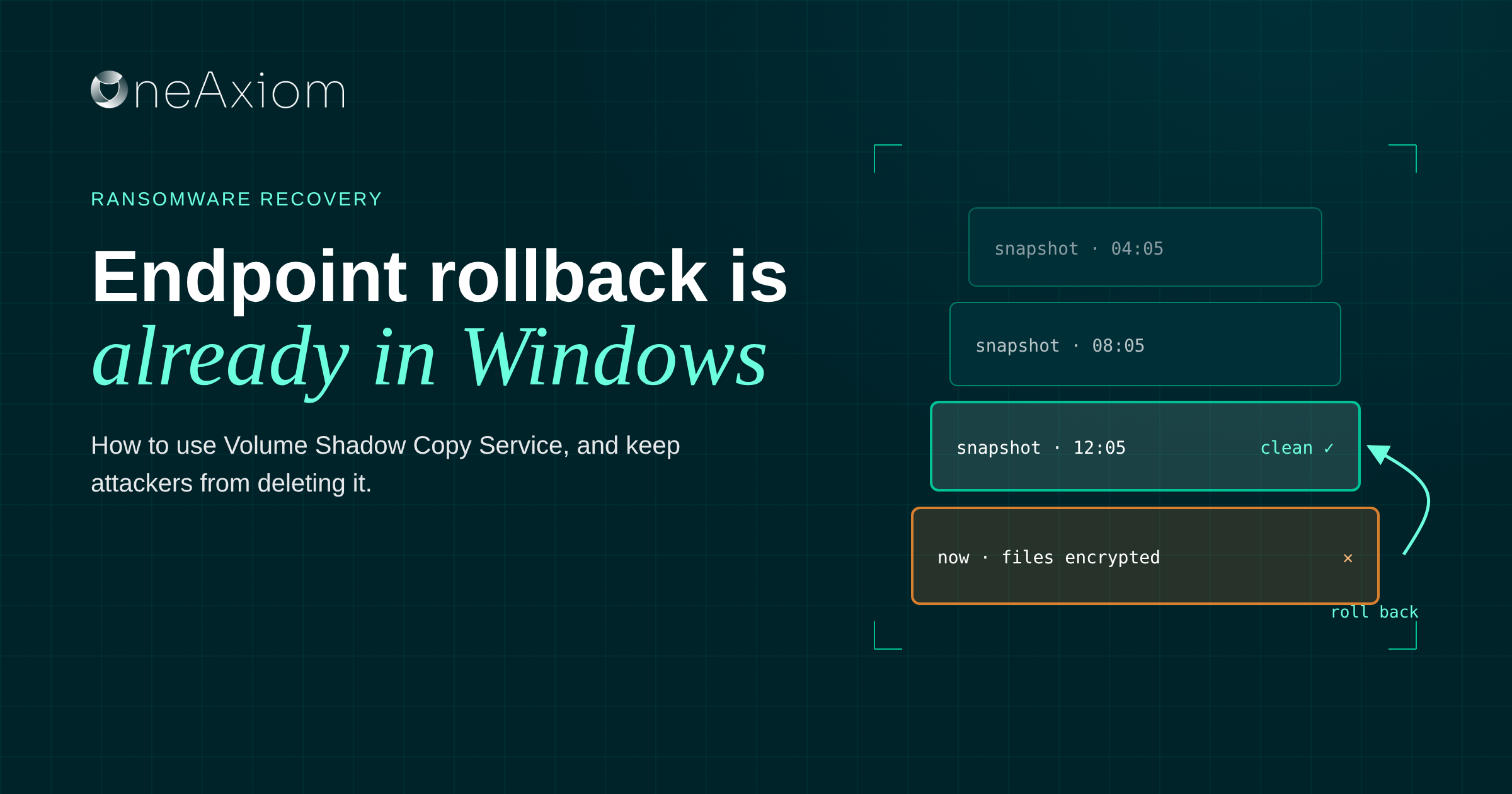

A customer asked me recently how to set up “rollback” on their endpoints. They’d sat through a few security vendor demos where someone clicked a big button and an infected laptop magically returned to yesterday.
Very impressive. Very expensive.
Here’s what those demos usually don’t mention: a lot of that rollback runs on a Windows feature you already own. It’s called Volume Shadow Copy Service, and it’s been in every version of Windows since XP.
The short answer: Windows shadow copies let you roll files and volumes back to an earlier snapshot at no extra cost. They’re a solid first layer for ransomware recovery, as long as you protect them, because deleting shadow copies is one of the first things ransomware does.
They don’t replace offline backups, and they don’t cover Mac or Linux.
I’ve gotten this question enough times that it deserves a proper write-up, so here’s how it works, where it falls short, and how to set it up so ransomware can’t just wipe it out.
What are Windows shadow copies?
Shadow copies are point-in-time snapshots of files or entire volumes, created by the Volume Shadow Copy Service (VSS) built into Windows. You’ll also see it called Volume Snapshot Service, or just VSS. It can snapshot files even while they’re open and in use, which is why backup software and System Restore lean on it.
Before you get excited, here’s the fine print.
- It’s incremental. After the first snapshot, VSS only stores the blocks that changed. That keeps it fast and light, so it won’t drag your endpoints down the way people expect.
- It needs NTFS or ReFS. That covers basically every modern Windows machine.
- It’s been around forever. VSS shipped with Windows XP and Server 2003 and has been in every version since.
- It’s not on everywhere by default. System Restore may be protecting the C: drive on some Windows clients, but data drives and servers are often left out. Many admins don’t know how much more it can do.
That last point is the whole reason vendors can charge for it. A feature nobody turns on looks a lot like a product when someone else turns it on for you.
Why attackers go after shadow copies first
Attackers know shadow copies exist too, and they plan around them. Deleting your snapshots is a routine step right before encryption, because a victim who can roll back doesn’t pay.
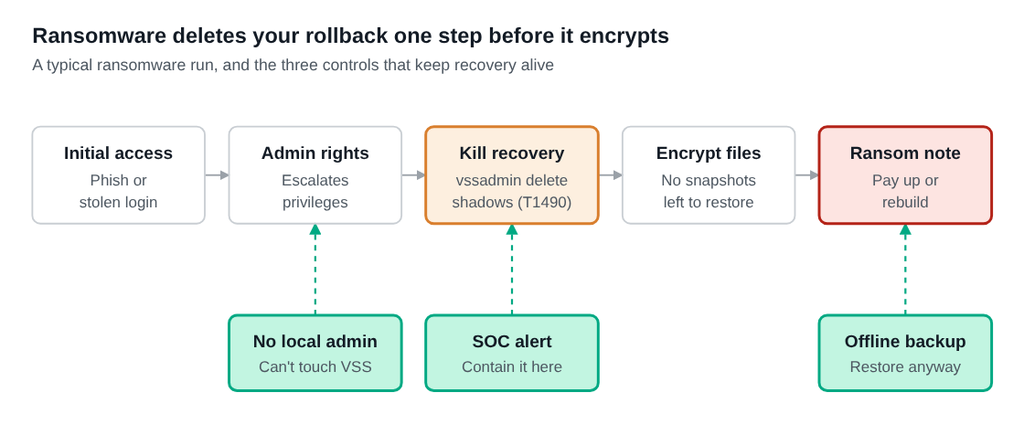
The deletion is loud if anyone is listening. It’s often the last clear warning before the files lock up, which makes it one of the best moments to catch an attack in progress.
Where shadow copies fall short
Shadow copies are a good first layer. They are not a backup strategy, and treating them like one is how people end up paying a ransom.
Ransomware knows about them. Deleting shadow copies is so standard in ransomware that MITRE ATT&CK lists it as T1490, Inhibit System Recovery. The usual move is vssadmin delete shadows /all /quiet, with WMI and PowerShell as backups. Your rollback is the first thing on their list.
They live on the same machine. If the disk dies, gets encrypted at a lower level, or the attacker has admin rights, your snapshots go down with it.
Windows only. Mac and Linux don’t use VSS, so this does nothing for your macOS fleet or Linux servers.
Storage has limits. Windows keeps up to 64 shadow copies per volume, and older ones get purged when the storage area fills up. If you only snapshot weekly and the attacker sat in your network for a month, your clean copy may already be gone.
Network storage gets heavy. Pushing endpoint snapshots to shared network or cloud volumes can put real strain on your infrastructure.
It has quirks. VSS has a long history of version-specific bugs, so test restores before you need one, not during the incident.
How to set up shadow copies on your endpoints
You can roll this out with Group Policy or any RMM tool. No new agent, no new invoice.
- Set aside storage for snapshots. Give each volume a shadow storage area, sized as a share of the disk. 10% is a reasonable starting point:
vssadmin resize shadowstorage /for=C: /on=C: /maxsize=10% - Create snapshots on a schedule. On Windows Server,
vssadmin create shadow /for=C:works out of the box. On Windows 10 and 11 that command isn’t available, so use the Win32_ShadowCopy Create method through PowerShell instead:Invoke-CimMethod -ClassName Win32_ShadowCopy -MethodName Create -Arguments @{ Volume = 'C:\'; Context = 'ClientAccessible' } - Push it everywhere. Wrap step 2 in a scheduled task and deploy it through a Group Policy Preference or your RMM. Several snapshots a day on busy file shares, at least daily on workstations.
- Turn on Shadow Copies for Shared Folders on file servers. Users can then restore their own files from the Previous Versions tab, which saves your help desk a lot of tickets.
- Test a restore. Right-click a folder, open Previous Versions, and bring something back. A snapshot you’ve never restored from is a theory, not a recovery plan.
Microsoft’s Volume Shadow Copy Service documentation covers the details for each Windows version.
How to keep ransomware from deleting your shadow copies
Turning on shadow copies is the easy part. Keeping them alive long enough to use them is the actual job.
Don’t rename vssadmin.exe.
You’ll still find old advice telling you to rename the binary so ransomware can’t call it. Skip it.
Renaming system files breaks updates and your own backup tools, and attackers just switch to WMI or PowerShell, which reach the same service without vssadmin.
Take away the admin rights instead.
Deleting shadow copies needs administrator privileges. Remove local admin from everyday accounts, use unique local admin passwords on every machine, and the attacker has to escalate before they can touch your snapshots.
Watch for the delete.
This is the step that actually saves you. Ransomware almost always clears recovery right before it encrypts, so a shadow copy deletion is one of the last warnings you’ll get. Your SOC should alert on it immediately:
vssadmin delete shadowsorvssadmin resize shadowstorageset to a tiny sizewmic shadowcopy deleteor PowerShell calling Delete onWin32_ShadowCopybcdeditturning off Windows recovery, orwbadmin delete catalog
Keep a copy the attacker can’t reach. For servers and critical workstations, add encrypted offsite backups with an immutable or offline copy. The 3-2-1 rule still holds: three copies, two types of media, one offsite.
Stop it before you need it. Rollback is the plan for when everything else failed. A well-tuned EDR, monitored around the clock, is what keeps you from needing it.
| Layer | What it stops | Owner | Cost |
|---|---|---|---|
| Shadow copies on a schedule | Accidental deletes, small infections, “I saved over it” | IT admin | Free, built into Windows |
| No local admin for daily accounts | Attackers deleting snapshots without escalating first | IT admin | Free |
| Alerts on shadow copy deletion | Ransomware in its last step before encryption | SOC | Detection rules |
| Offsite, immutable backups | A wiped or encrypted machine, snapshots and all | IT admin | Backup licensing and storage |
| EDR with 24/7 monitoring | The attack before it reaches your recovery points | SOC | EDR and MDR |
Frequently asked questions
Can Windows shadow copies recover files after ransomware?
Sometimes. If the ransomware didn’t delete them, you can restore files from an earlier snapshot. Most ransomware tries to delete shadow copies first, so pair them with alerts on deletion and offline backups.
Is endpoint rollback the same as shadow copies?
Often, yes. Many security products that advertise rollback use Windows Volume Shadow Copy Service under the hood, with their own scheduling, protection and interface on top.
Are shadow copies enabled by default in Windows?
Not everywhere. System Restore may cover the system drive on some Windows clients, but data drives and servers usually need it turned on and scheduled.
How do I create a shadow copy on Windows 10 or 11?
Use PowerShell with the Win32_ShadowCopy class: Invoke-CimMethod -ClassName Win32_ShadowCopy -MethodName Create -Arguments @{ Volume = 'C:\'; Context = 'ClientAccessible' }. The vssadmin create shadow command only works on Windows Server.
Why does ransomware run vssadmin delete shadows?
To remove your easiest recovery option so paying the ransom looks like the only way out. MITRE ATT&CK tracks this as T1490, Inhibit System Recovery.
Do shadow copies work on Mac or Linux?
No. VSS is Windows only. macOS and Linux need their own snapshot or backup tools.
The rollback button was in Windows all along
You don’t need to buy rollback to get rollback. Turn on shadow copies, take admin rights away from the accounts that don’t need them, and make sure somebody is actually watching for the moment an attacker tries to delete them. Then keep a real backup somewhere they can’t reach.
That “somebody watching” part is where most teams come up short, especially at 3 a.m. on a holiday weekend, which is exactly when ransomware likes to show up. If you’d like to know whether your environment would catch a shadow copy deletion before the encryption starts, book a call with our team. We’ll walk through your setup and show you where the gaps are, whether or not you work with us.
By Michael Darlan, Cybersecurity Specialist at OneAxiom